All templates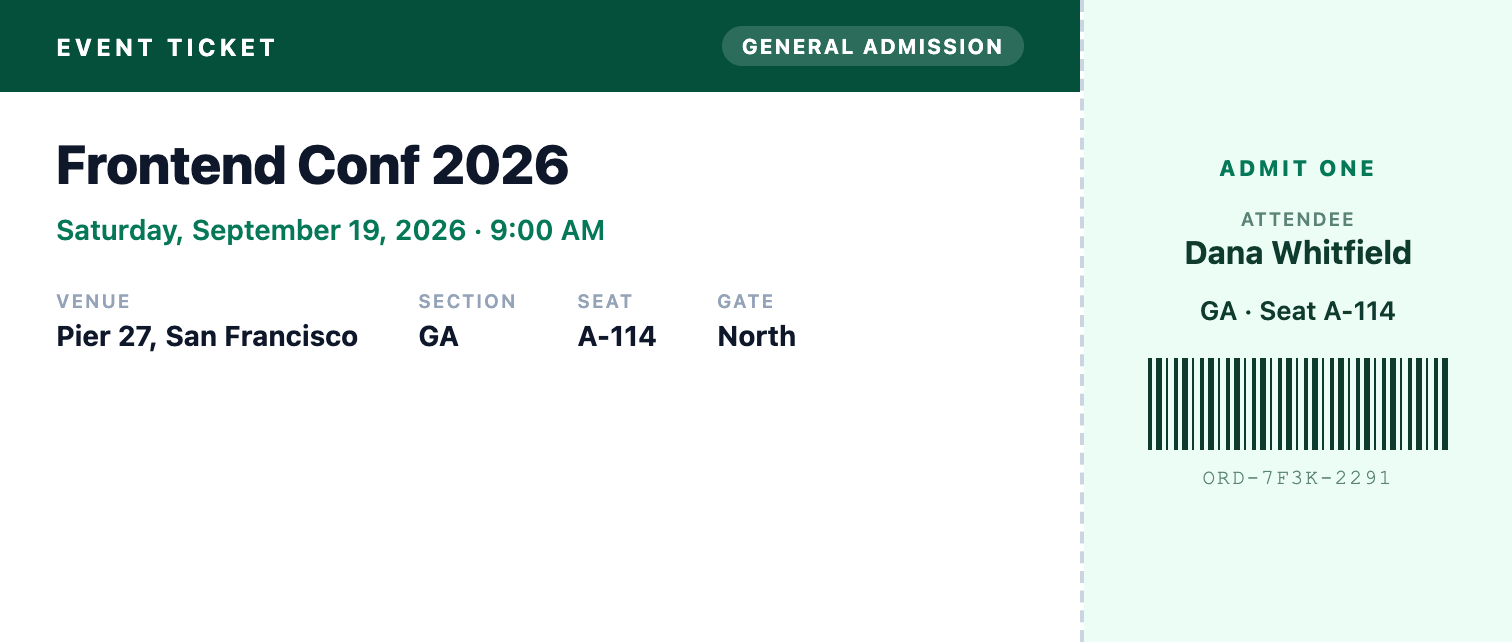
Event ticket template
200 x 85 mmA custom ticket-sized PDF with the event details, a perforated stub, an attendee name, and a barcode rendered in pure CSS. One call per attendee produces their ticket.
The exact PDF the API produces. What you preview is what you generate.
Generate with the API
Use this template, publish it to get a template id, then call the API with your data. Replace YOUR_TEMPLATE_ID and YOUR_API_KEY with your own.
import { writeFile } from "node:fs/promises";
import { PdfGlyph } from "pdfglyph";

const client = new PdfGlyph({
  apiKey: "YOUR_API_KEY",
  baseUrl: "https://api.pdfglyph.dev",
});

const { pdf } = await client.generate({
  templateId: "YOUR_TEMPLATE_ID",
  data: {
    "eventName": "Frontend Conf 2026",
    "eventDate": "Saturday, September 19, 2026",
    "eventTime": "9:00 AM",
    "venue": "Pier 27, San Francisco",
    "section": "GA",
    "seat": "A-114",
    "gate": "North",
    "ticketType": "General Admission",
    "attendeeName": "Dana Whitfield",
    "orderNumber": "ORD-7F3K-2291"
  },
});

// pdf is a Uint8Array — write it to a file, return it, or stream it.
await writeFile("document.pdf", pdf);
Sample data
The JSON this preview was rendered from. Match these fields, or edit the template to fit the data you already have.
{
  "eventName": "Frontend Conf 2026",
  "eventDate": "Saturday, September 19, 2026",
  "eventTime": "9:00 AM",
  "venue": "Pier 27, San Francisco",
  "section": "GA",
  "seat": "A-114",
  "gate": "North",
  "ticketType": "General Admission",
  "attendeeName": "Dana Whitfield",
  "orderNumber": "ORD-7F3K-2291"
}
Start from the Event ticket template
Open it in the editor as a new draft, adjust the HTML until it looks like yours, then generate PDFs from your code.